
PolyTrack
★ 5.00 plays0 likes
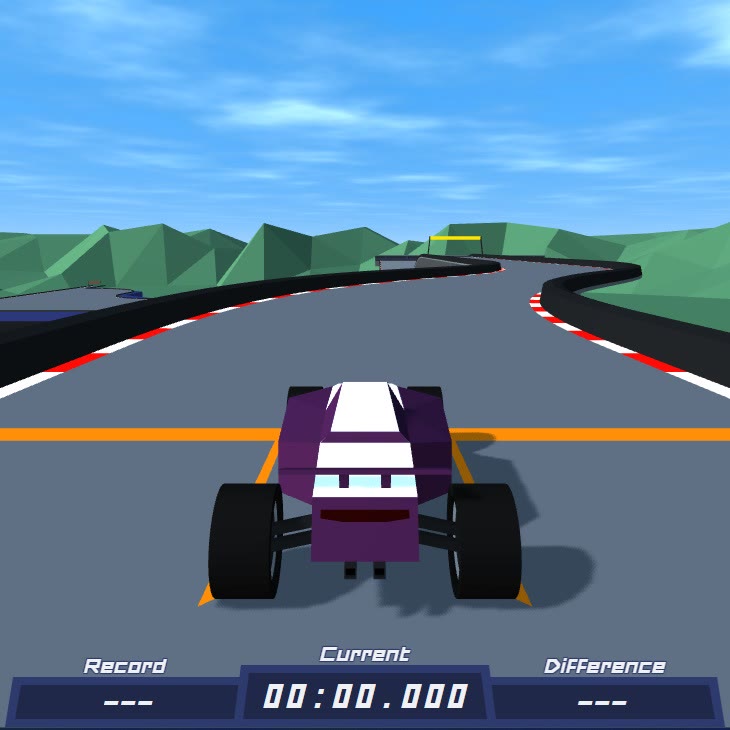
PolyTrack is a time-trial racer with no opponents. There is a car, a track full of loops and ramps, a timer and your own best lap sitting next to it. Nobody to bump into, nobody to blame — just a low-poly course and a number that could always be smaller.
The layout is TrackMania's idea shrunk to a browser: short courses made of road pieces, huge jumps, banked turns, tunnels, and the occasional piece of geometry clearly designed by someone who wanted to watch you fail. Checkpoints split each track into sections, and crashing does not end the run so much as ask you whether you would rather restart from the last checkpoint or start again from the line.
Restarting is instant — R and you are moving again — which is the single most important design decision in the game. It costs nothing to abandon a bad first corner, so the game becomes a loop of short, focused attempts rather than one long nervous lap. Ghost cars make that loop sharper: race your own best run alongside and you can see exactly where the second you keep losing actually goes.
There is also an editor. Road pieces, ramps, walls and checkpoints, a test button, and an export code to share the result. It is the fastest way to understand why a corner you keep crashing on is built the way it is.
How to play
Goal: finish each track as fast as you can, then beat that time. Records are saved per track; checkpoints let you restart a section instead of the whole course.
Controls: W or Up to accelerate, S or Down to brake and reverse, A and D to steer. R or Enter restarts the run, C changes the camera, Esc returns to the menu. Click once inside the game before you drive so the keyboard reaches the canvas.
Tips:
- Brake before the corner, not in it. Slow in, fast out is worth more time than any amount of nerve.
- Line the car up before every ramp. Steering in mid-air barely works, and a crooked landing throws away the speed you launched with.
- Restart the moment a run goes wrong. A lap that is half a second down in the first corner is not coming back.
- Turn the ghost car on in the settings. Watching your own best line is more useful than any tutorial.
- Controls
- mouse, keyboard
- Platform
- desktop, tablet
- Released
- Nov 1, 2026
- Updated
- Nov 16, 2026
- Developer
- Kodub
What is PolyTrack?
PolyTrack is a low-poly time-trial racing game by Kodub, built as an HTML5 browser game and inspired by TrackMania. You drive alone against a clock on short courses assembled from road pieces, ramps, loops and tunnels, with checkpoints that mark your progress and a saved record on every track.
There are no rival cars, no upgrades and no vehicle tuning. The car is the same for everyone, which makes every second on the leaderboard a genuine skill difference.
How to play PolyTrack
Pick a track, click into the game so it captures the keyboard, and drive. The checkpoint counter in the corner tells you how much of the course is behind you and the timer at the bottom shows your current run against your record. Falling off or hitting a wall is not fatal — you restart instantly, either from the line or from the last checkpoint.
Objective: set the fastest time you can on each track, then keep lowering it.
PolyTrack controls
- W / Up arrow — accelerate
- S / Down arrow — brake and reverse
- A / D or left / right arrows — steer
- R or Enter — restart the run
- C — change camera
- Esc — back to the menu
In the editor: left click places a piece, right click pans, middle-drag rotates the view, the scroll wheel zooms, Shift plus the wheel or Z and C raises and lowers a piece, R or Space rotates it, X deletes it and T test-drives the track.
Tips and tricks for PolyTrack
- Learn the track before you push it. Your first three laps should be about finding the line, not about the clock. Speed on an unfamiliar corner is just a longer crash.
- Brake early, accelerate late. The car keeps momentum, so a clean exit from a corner is worth more than a brave entry.
- Restart instantly. With R, a bad lap costs one second. Finishing it out of stubbornness costs a minute.
- Enter ramps straight and centred. You cannot steer meaningfully in the air, so the launch angle is the landing angle.
- Race the ghost. Turn it on, follow your best run, and watch where it pulls away — that is the section to practise.
What is the PolyTrack track editor?
The editor lets you build a course from the same pieces the official tracks use: straights, curves, ramps, walls, checkpoints. You place pieces on a grid, test the result instantly, save it locally and export a share code. It is a genuinely good learning tool — building a corner teaches you why the corner you keep crashing on is shaped that way.
Is there multiplayer in PolyTrack?
No. It is a solo time trial with ghost replays rather than live racing. Competition happens through leaderboards and shared track codes, not through other cars on the road.
Is PolyTrack free to play?
Yes. It is free in the browser, with no download, no account and no in-app purchases. Records and saved tracks live in your browser storage.
Can I play PolyTrack on mobile?
It loads on a phone, but driving wants a keyboard: the steering is analogue in feel and the restart loop depends on a fast key press. Desktop or laptop is the way it is meant to be played.
Games like PolyTrack
For the same instant-restart time-trial feeling, Moto X3M and Drive Mad are the closest neighbours. If you want traffic and chases instead of a clock, Drift Hunters and Escape Road are the next tabs.